

moabb.datasets.Liu2020BETA#
- class moabb.datasets.Liu2020BETA(subjects=None, sessions=None)[source]#
Bases:
BaseDataset[source]Dataset Snapshot
Liu2020BETA
SSVEP, 40 classes
SSVEP Code: Liu2020BETA 70 subjects 1 session 64 ch 250 Hz 40 classes 3.0 s trialsClass Labels: 8.6, 8.8, 9, 9.2, 9.4, 9.6, 9.8, 10, ...
Citation & Impact
- Paper DOI10.3389/fnins.2020.00627
- CitationsLoading…
- Public APICrossref | OpenAlex
- Page Views30d: 11 · all-time: 11#108 of 152 · Top 72% most viewedUpdated: 2026-03-30 UTC
Stimulus Protocol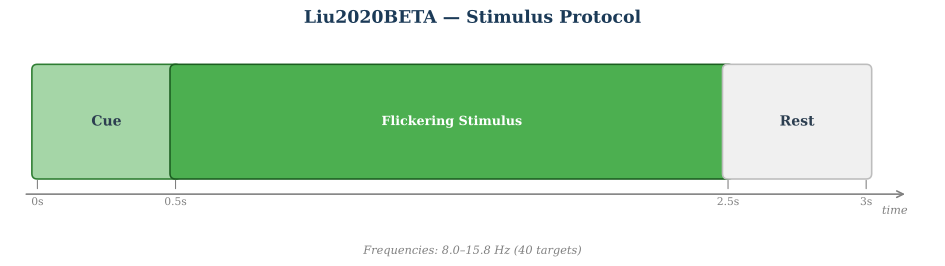
3s task window per trial · 40-class ssvep paradigm · 1 runs/session across 1 sessions
HED Event TagsHED tagsSource: MOABB BIDS HED annotation mapping.
8.6Sensory-eventExperimental-stimulusVisual-presentationLabel8.8Sensory-eventExperimental-stimulusVisual-presentationLabel9Sensory-eventExperimental-stimulusVisual-presentationLabel9.2Sensory-eventExperimental-stimulusVisual-presentationLabel9.4Sensory-eventExperimental-stimulusVisual-presentationLabel9.6Sensory-eventExperimental-stimulusVisual-presentationLabel9.8Sensory-eventExperimental-stimulusVisual-presentationLabel10Sensory-eventExperimental-stimulusVisual-presentationLabel10.2Sensory-eventExperimental-stimulusVisual-presentationLabel10.4Sensory-eventExperimental-stimulusVisual-presentationLabel10.6Sensory-eventExperimental-stimulusVisual-presentationLabel10.8Sensory-eventExperimental-stimulusVisual-presentationLabel11Sensory-eventExperimental-stimulusVisual-presentationLabel11.2Sensory-eventExperimental-stimulusVisual-presentationLabel11.4Sensory-eventExperimental-stimulusVisual-presentationLabel11.6Sensory-eventExperimental-stimulusVisual-presentationLabel11.8Sensory-eventExperimental-stimulusVisual-presentationLabel12Sensory-eventExperimental-stimulusVisual-presentationLabel12.2Sensory-eventExperimental-stimulusVisual-presentationLabel12.4Sensory-eventExperimental-stimulusVisual-presentationLabel12.6Sensory-eventExperimental-stimulusVisual-presentationLabel12.8Sensory-eventExperimental-stimulusVisual-presentationLabel13Sensory-eventExperimental-stimulusVisual-presentationLabel13.2Sensory-eventExperimental-stimulusVisual-presentationLabel13.4Sensory-eventExperimental-stimulusVisual-presentationLabel13.6Sensory-eventExperimental-stimulusVisual-presentationLabel13.8Sensory-eventExperimental-stimulusVisual-presentationLabel14Sensory-eventExperimental-stimulusVisual-presentationLabel14.2Sensory-eventExperimental-stimulusVisual-presentationLabel14.4Sensory-eventExperimental-stimulusVisual-presentationLabel14.6Sensory-eventExperimental-stimulusVisual-presentationLabel14.8Sensory-eventExperimental-stimulusVisual-presentationLabel15Sensory-eventExperimental-stimulusVisual-presentationLabel15.2Sensory-eventExperimental-stimulusVisual-presentationLabel15.4Sensory-eventExperimental-stimulusVisual-presentationLabel15.6Sensory-eventExperimental-stimulusVisual-presentationLabel15.8Sensory-eventExperimental-stimulusVisual-presentationLabel8Sensory-eventExperimental-stimulusVisual-presentationLabel8.2Sensory-eventExperimental-stimulusVisual-presentationLabel8.4Sensory-eventExperimental-stimulusVisual-presentationLabelHED tree view
Tree · 8.6
├─ Sensory-event ├─ Experimental-stimulus ├─ Visual-presentation └─ Label
Tree · 8.8
├─ Sensory-event ├─ Experimental-stimulus ├─ Visual-presentation └─ Label
Tree · 9
├─ Sensory-event ├─ Experimental-stimulus ├─ Visual-presentation └─ Label
Tree · 9.2
├─ Sensory-event ├─ Experimental-stimulus ├─ Visual-presentation └─ Label
Tree · 9.4
├─ Sensory-event ├─ Experimental-stimulus ├─ Visual-presentation └─ Label
Tree · 9.6
├─ Sensory-event ├─ Experimental-stimulus ├─ Visual-presentation └─ Label
Tree · 9.8
├─ Sensory-event ├─ Experimental-stimulus ├─ Visual-presentation └─ Label
Tree · 10
├─ Sensory-event ├─ Experimental-stimulus ├─ Visual-presentation └─ Label
Tree · 10.2
├─ Sensory-event ├─ Experimental-stimulus ├─ Visual-presentation └─ Label
Tree · 10.4
├─ Sensory-event ├─ Experimental-stimulus ├─ Visual-presentation └─ Label
Tree · 10.6
├─ Sensory-event ├─ Experimental-stimulus ├─ Visual-presentation └─ Label
Tree · 10.8
├─ Sensory-event ├─ Experimental-stimulus ├─ Visual-presentation └─ Label
Tree · 11
├─ Sensory-event ├─ Experimental-stimulus ├─ Visual-presentation └─ Label
Tree · 11.2
├─ Sensory-event ├─ Experimental-stimulus ├─ Visual-presentation └─ Label
Tree · 11.4
├─ Sensory-event ├─ Experimental-stimulus ├─ Visual-presentation └─ Label
Tree · 11.6
├─ Sensory-event ├─ Experimental-stimulus ├─ Visual-presentation └─ Label
Tree · 11.8
├─ Sensory-event ├─ Experimental-stimulus ├─ Visual-presentation └─ Label
Tree · 12
├─ Sensory-event ├─ Experimental-stimulus ├─ Visual-presentation └─ Label
Tree · 12.2
├─ Sensory-event ├─ Experimental-stimulus ├─ Visual-presentation └─ Label
Tree · 12.4
├─ Sensory-event ├─ Experimental-stimulus ├─ Visual-presentation └─ Label
Tree · 12.6
├─ Sensory-event ├─ Experimental-stimulus ├─ Visual-presentation └─ Label
Tree · 12.8
├─ Sensory-event ├─ Experimental-stimulus ├─ Visual-presentation └─ Label
Tree · 13
├─ Sensory-event ├─ Experimental-stimulus ├─ Visual-presentation └─ Label
Tree · 13.2
├─ Sensory-event ├─ Experimental-stimulus ├─ Visual-presentation └─ Label
Tree · 13.4
├─ Sensory-event ├─ Experimental-stimulus ├─ Visual-presentation └─ Label
Tree · 13.6
├─ Sensory-event ├─ Experimental-stimulus ├─ Visual-presentation └─ Label
Tree · 13.8
├─ Sensory-event ├─ Experimental-stimulus ├─ Visual-presentation └─ Label
Tree · 14
├─ Sensory-event ├─ Experimental-stimulus ├─ Visual-presentation └─ Label
Tree · 14.2
├─ Sensory-event ├─ Experimental-stimulus ├─ Visual-presentation └─ Label
Tree · 14.4
├─ Sensory-event ├─ Experimental-stimulus ├─ Visual-presentation └─ Label
Tree · 14.6
├─ Sensory-event ├─ Experimental-stimulus ├─ Visual-presentation └─ Label
Tree · 14.8
├─ Sensory-event ├─ Experimental-stimulus ├─ Visual-presentation └─ Label
Tree · 15
├─ Sensory-event ├─ Experimental-stimulus ├─ Visual-presentation └─ Label
Tree · 15.2
├─ Sensory-event ├─ Experimental-stimulus ├─ Visual-presentation └─ Label
Tree · 15.4
├─ Sensory-event ├─ Experimental-stimulus ├─ Visual-presentation └─ Label
Tree · 15.6
├─ Sensory-event ├─ Experimental-stimulus ├─ Visual-presentation └─ Label
Tree · 15.8
├─ Sensory-event ├─ Experimental-stimulus ├─ Visual-presentation └─ Label
Tree · 8
├─ Sensory-event ├─ Experimental-stimulus ├─ Visual-presentation └─ Label
Tree · 8.2
├─ Sensory-event ├─ Experimental-stimulus ├─ Visual-presentation └─ Label
Tree · 8.4
├─ Sensory-event ├─ Experimental-stimulus ├─ Visual-presentation └─ Label
Channel SummaryTotal channels64EEG64Montage10-05Sampling250 HzReferenceCzNotch / line50 HzThis diagram is automatically generated from MOABB metadata. Please consult the original publication to confirm the experimental protocol details.
BETA SSVEP benchmark dataset.
Dataset from [1].
The BETA database contains 64-channel EEG recordings from 70 healthy subjects (42 males, 28 females, aged 9-64 years, mean age 25.14) performing a 40-target cued-spelling SSVEP-BCI task. Unlike Wang2016 which was collected in a shielded room, BETA was recorded in a normal classroom, providing a more realistic BCI benchmark.
Stimuli used joint frequency and phase modulation (JFPM) with 40 targets arranged in a 5x8 QWERTY virtual keyboard. Frequencies ranged from 8.0 to 15.8 Hz (0.2 Hz step) with initial phases from 0 to 19.5*pi (0.5*pi step).
Each subject completed 4 blocks of 40 trials. Stimulation duration was 2 s for subjects S1-S15 (experienced) and 3 s for subjects S16-S70 (naive), plus a 0.5 s visual cue. EEG was recorded at 1000 Hz with a Synamps2 system (Neuroscan) using 64 channels in the international 10-10 system, then downsampled to 250 Hz.
Data are stored as 4D matrices [64, 750, 4, 40] corresponding to [channels, time points, block index, target index]. Each epoch is 3 s (750 samples at 250 Hz).
Warning
Like Wang2016, this dataset includes channels ‘CB1’ and ‘CB2’ which are not part of the standard 10-20 montage. They are treated as standard EEG channels with
on_missing="ignore"for montage setting.The data is downloaded from the Tsinghua BCI Lab server in tar.gz archives grouped by 10 subjects each. The download may be slow depending on server availability.
References
[1]B. Liu, X. Huang, Y. Wang, X. Chen, and X. Gao, “BETA: A Large Benchmark Database Toward SSVEP-BCI Application,” Frontiers in Neuroscience, vol. 14, p. 627, 2020. DOI: 10.3389/fnins.2020.00627
from moabb.datasets import Liu2020BETA

dataset = Liu2020BETA()
data = dataset.get_data(subjects=[1])
print(data[1])
Dataset summary
#Subj
70
#Chan
64
#Classes
40
#Trials / class
4
Trials length
3 s
Freq
250 Hz
#Sessions
1
Participants
Population: healthy
Age: 25.14 (range: 9-64) years
BCI experience: mixed
Equipment
Amplifier: Synamps2 (Neuroscan)
Montage: standard_1005
Reference: Cz
Preprocessing
Data state: epoched
Data Access
DOI: 10.3389/fnins.2020.00627
Data URL: http://bci.med.tsinghua.edu.cn/upload/liubingchuan/
Repository: Tsinghua BCI Lab
Experimental Protocol
Paradigm: ssvep
Task type: cued-spelling
Feedback: visual
Stimulus: JFPM visual flicker
- property all_subjects#
Full list of subjects available in this dataset (unfiltered).
- convert_to_bids(path=None, subjects=None, overwrite=False, format='EDF', verbose=None, generate_figures=False)[source]#
Convert the dataset to BIDS format.
Saves the raw EEG data in a BIDS-compliant directory structure. Unlike the caching mechanism (see
CacheConfig), the files produced here do not contain a processing-pipeline hash (desc-<hash>) in their names, making the output a clean, shareable BIDS dataset.- Parameters:
path (str |
Path| None) – Directory under which the BIDS dataset will be written. IfNonethe default MNE data directory is used (same default as the rest of MOABB).subjects (list of int | None) – Subject numbers to convert. If
None, all subjects insubject_listare converted.overwrite (bool) – If
True, existing BIDS files for a subject are removed before saving. Default isFalse.format (str) – The file format for the raw EEG data. Supported values are
"EDF"(default),"BrainVision", and"EEGLAB".verbose (str | None) – Verbosity level forwarded to MNE/MNE-BIDS.
generate_figures (bool) – If
True, generate interactive neural signature HTML figures in{bids_root}/derivatives/neural_signatures/. Requiresplotly(pip install moabb[interactive]). Default isFalse.
- Returns:
bids_root – Path to the root of the written BIDS dataset.
- Return type:
Examples
>>> from moabb.datasets import AlexMI
>>> dataset = AlexMI()
>>> bids_root = dataset.convert_to_bids(path='/tmp/bids', subjects=[1])
Notes
Use
CacheConfigto configure caching forget_data(). Usemoabb.datasets.bids_interface.get_bids_rootto get the BIDS root path.Added in version 1.5.
- data_path(subject, path=None, force_update=False, update_path=None, verbose=None)[source]#
Get path to local copy of a subject data.
- Parameters:
subject (int) – Number of subject to use
path (None | str) – Location of where to look for the data storing location. If None, the environment variable or config parameter
MNE_DATASETS_(dataset)_PATHis used. If it doesn’t exist, the “~/mne_data” directory is used. If the dataset is not found under the given path, the data will be automatically downloaded to the specified folder.force_update (bool) – Force update of the dataset even if a local copy exists.
update_path (bool | None Deprecated) – If True, set the MNE_DATASETS_(dataset)_PATH in mne-python config to the given path. If None, the user is prompted.
verbose (bool, str, int, or None) – If not None, override default verbose level (see
mne.verbose()).
- Returns:
path – Local path to the given data file. This path is contained inside a list of length one, for compatibility.
- Return type:
- download(subject_list=None, path=None, force_update=False, update_path=None, accept=False, verbose=None)[source]#
Download all data from the dataset.
This function is only useful to download all the dataset at once.
- Parameters:
subject_list (list of int | None) – List of subjects id to download, if None all subjects are downloaded.
path (None | str) – Location of where to look for the data storing location. If None, the environment variable or config parameter
MNE_DATASETS_(dataset)_PATHis used. If it doesn’t exist, the “~/mne_data” directory is used. If the dataset is not found under the given path, the data will be automatically downloaded to the specified folder.force_update (bool) – Force update of the dataset even if a local copy exists.
update_path (bool | None) – If True, set the MNE_DATASETS_(dataset)_PATH in mne-python config to the given path. If None, the user is prompted.
accept (bool) – Accept licence term to download the data, if any. Default: False
verbose (bool, str, int, or None) – If not None, override default verbose level (see
mne.verbose()).
- get_additional_metadata(subject: str, session: str, run: str)[source]#
Load additional metadata for a specific subject, session, and run.
This method is intended to be overridden by subclasses to provide additional metadata specific to the dataset. The metadata is typically loaded from an events.tsv file or similar data source.
- Parameters:
- Returns:
A DataFrame containing the additional metadata if available, otherwise None.
- Return type:
None |
pandas.DataFrame
- get_block_repetition(paradigm, subjects, block_list, repetition_list)[source]#
Select data for all provided subjects, blocks and repetitions.
subject -> session -> run -> block -> repetition
See also
- get_data(subjects=None, cache_config=None, process_pipeline=None)[source]#
Return the data corresponding to a list of subjects.
The returned data is a dictionary with the following structure:
data = {'subject_id' :
            {'session_id':
                {'run_id': run}
            }
        }
subjects are on top, then we have sessions, then runs. A sessions is a recording done in a single day, without removing the EEG cap. A session is constitued of at least one run. A run is a single contiguous recording. Some dataset break session in multiple runs.
Processing steps can optionally be applied to the data using the
*_pipelinearguments. These pipelines are applied in the following order:raw_pipeline->epochs_pipeline->array_pipeline. If a*_pipelineargument isNone, the step will be skipped. Therefore, thearray_pipelinemay either receive amne.io.Rawor amne.Epochsobject as input depending on whetherepochs_pipelineisNoneor not.- Parameters:
subjects (List of int) – List of subject number
cache_config (dict |
CacheConfig) – Configuration for caching of datasets. SeeCacheConfigfor details.process_pipeline (
sklearn.pipeline.Pipeline| None) – Optional processing pipeline to apply to the data. To generate an adequate pipeline, we recommend usingmoabb.make_process_pipelines(). This pipeline will receivemne.io.BaseRawobjects. The steps names of this pipeline should be elements ofStepType. According to their name, the steps should either return amne.io.BaseRaw, amne.Epochs, or anumpy.ndarray. This pipeline must be “fixed” because it will not be trained, i.e. no call tofitwill be made.
- Returns:
data – dict containing the raw data
- Return type:
Dict
- property metadata[source]#
Return structured metadata for this dataset.
Returns the DatasetMetadata object from the centralized catalog, or None if metadata is not available for this dataset.
- Returns:
The metadata object containing acquisition parameters, participant demographics, experiment details, and documentation. Returns None if no metadata is registered for this dataset.
- Return type:
DatasetMetadata| None
Examples
>>> from moabb.datasets import BNCI2014_001
>>> dataset = BNCI2014_001()
>>> dataset.metadata.participants.n_subjects
9
>>> dataset.metadata.acquisition.sampling_rate
250.0